



Mixed-format assessments are killing grading efficiency. Essays, short answers, coding problems and multiple choice each demand different evaluation approaches and different time investments, creating operational chaos for educators and trainers alike.
Most teams respond with brute force—grading everything manually or trying to automate everything and accepting quality loss. There is a third path: define clear automation boundaries and use human-in-the-loop triggers so automation handles mechanical checks while humans focus where judgment matters.
The mixed-format grading trap
Mixed-format assessments exist for good reasons: multiple choice tests breadth, essays show depth, coding problems reveal applied skill, and cases test judgment. Operationally, however, they create multiple incompatible grading workflows and uneven quality controls.
A single exam can have fast automated scoring for objective items but slow, nuanced review for essays and code. Scaling that combination across hundreds of candidates fragments work, increases turnaround, and produces inconsistent results as graders fatigue or lose context.
Why sampling beats exhaustive review
You do not need to manually review every response to preserve scoring quality. Statistical sampling—augmented with automated outlier detection and triggered reviews—lets you verify automation accuracy and only escalate when data shows issues.
Eliminate assessment bottlenecks.
Evaloly simplifies every step from test design to results analysis, making assessments faster and more reliable.
- Customizable test creation
- Automated grading and analytics
- Secure distribution and proctoring
No credit card required
-
Random baseline sample (usually 10–20%)
-
Automatically include outliers flagged by checks
-
Trigger review for systemic patterns (e.g., everyone missing same item)
-
Run periodic calibration checks
Example: instead of reviewing all coding submissions for 200 candidates, sample 20% randomly and add any automated edge cases. If the sample shows ≥95% accuracy, trust automation for the rest; otherwise expand review.
Sampling QA — worked example and escalation rules
Use the standard proportion sample-size baseline with finite-population correction so your sample sizes are defensible rather than ad hoc.
In plain terms: pick Z for confidence (1.96 for 95%), p as expected error rate (use 0.5 conservatively), and E as margin of error (0.05 for ±5%). That yields n0 ≈ 385 for large populations.
Apply finite-population correction: n = n0 / (1 + (n0−1)/N). For N=200 and 95% CI ±5% you get n ≈ 132; a conservative default is max(n, 50).
-
Low
continue automated scoring with routine monitoring and regular sampling
-
Moderate
increase sample size, re-norm raters and pause auto-approvals for borderline cases
-
High
suspend automation for the item type, switch to 100% human review and run root-cause analysis
-
Stratify samples by item type, score band and model confidence
-
Log every sampled decision, human override, rubric and model version
-
See NIST AI RMF playbook for human oversight guidance
https://airc.nist.gov/airmf-resources/playbook/
Building rubrics that enable partial automation
Most rubrics are written for humans and don't separate automatable checks from judgment tasks. For hybrid workflows, split rubrics into mechanical (automatable) and interpretive (human) layers.
-
Word count and formatting checks
-
Citation formatting and presence of required sections
-
Keyword/concept inclusion
-
Grammar and spelling thresholds
-
Code functionality and calculation correctness
-
Required section presence
-
Argument coherence and structure
-
Creative problem solving
-
Contextual and domain understanding
-
Nuanced interpretation and ethical reasoning
-
Strategic thinking and feasibility
Example: a 30-point business case can be split into a 10-point automated layer for mechanical checks and a 20-point human layer for judgment, letting automation handle instant passes/fails and humans focus on strategy and nuance.
-
Automated checks
section presence, citation count, required elements, word minimum, terminology
-
Human review
competitive analysis, feasibility, strategic thinking, risk assessment
Human-in-the-loop triggers that work
Triggers determine when humans step in. Well-designed triggers catch edge cases and bias while keeping the bulk of mechanical work automated.
-
Score variance
route unusually low or high automated scores for human review
-
Confidence threshold
send NLP-scored responses below a confidence cutoff (e.g., 70%)
-
Pattern detection
flag identical unusual patterns across multiple assessments
-
Fairness checks
escalate when demographic score disparities exceed expectations
A certification program avoided legal exposure when fairness triggers identified that international English speakers were being downgraded; human review found culturally biased criteria and fixed scoring before pass rates were affected.
Time-savings reality check
Percent savings depend on assessment mix. Hybrid workflows reduce time by automating objective checks and sampling human review for subjective parts; they also improve consistency and grader stamina.
| Assessment Component | Traditional Time | Hybrid Workflow Time | Method |
|---|---|---|---|
| 30 Multiple Choice | 7.5 minutes | 0 minutes | Fully automated |
| 5 Short Answers | 10 minutes | 2 minutes | Auto-scored with 20% sampling |
| 2 Essays | 16 minutes | 8 minutes | Rubric automation + human review |
| 1 Case Study | 12 minutes | 6 minutes | Structured scoring + human judgment |
| Total per Assessment | 45.5 minutes | 16 minutes | 65% reduction |
| 100 Assessments | 75.8 hours | 26.7 hours | 49.1 hours saved |
-
Technical assessments with objective components
70–80% time reduction
-
Essay-heavy humanities assessments
40–50% time reduction
-
Mixed professional certifications
55–65% time reduction
-
Complex case study evaluations
30–40% time reduction
Beyond raw time, benefits include better consistency, reduced grader fatigue, and higher-quality feedback because graders can focus effort where it matters.
Workflow orchestration specifics
Automation succeeds when the entire workflow is redesigned around automation boundaries rather than bolted onto existing manual processes.
Phase 1: Immediate automated processing
-
Multiple choice scoring
-
Keyword detection in written responses
-
Code compilation and testing
-
Plagiarism checking
-
Format compliance verification
-
Initial rubric scoring
Phase 2: Sampling and triggered reviews
-
Random sample selection stratified by score and item type
-
Triggered reviews for outliers and low-confidence cases
-
Priority flagging for failing or high-stakes assessments
Phase 3: Human judgment and override
-
Sample verification for quality checks
-
Investigate triggered and flagged cases
-
Score overrides and detailed feedback writing
Phase 4: Calibration and adjustment
-
Identify systematic scoring variations
-
Refine rubrics and automation rules
-
Update calibration and model versions
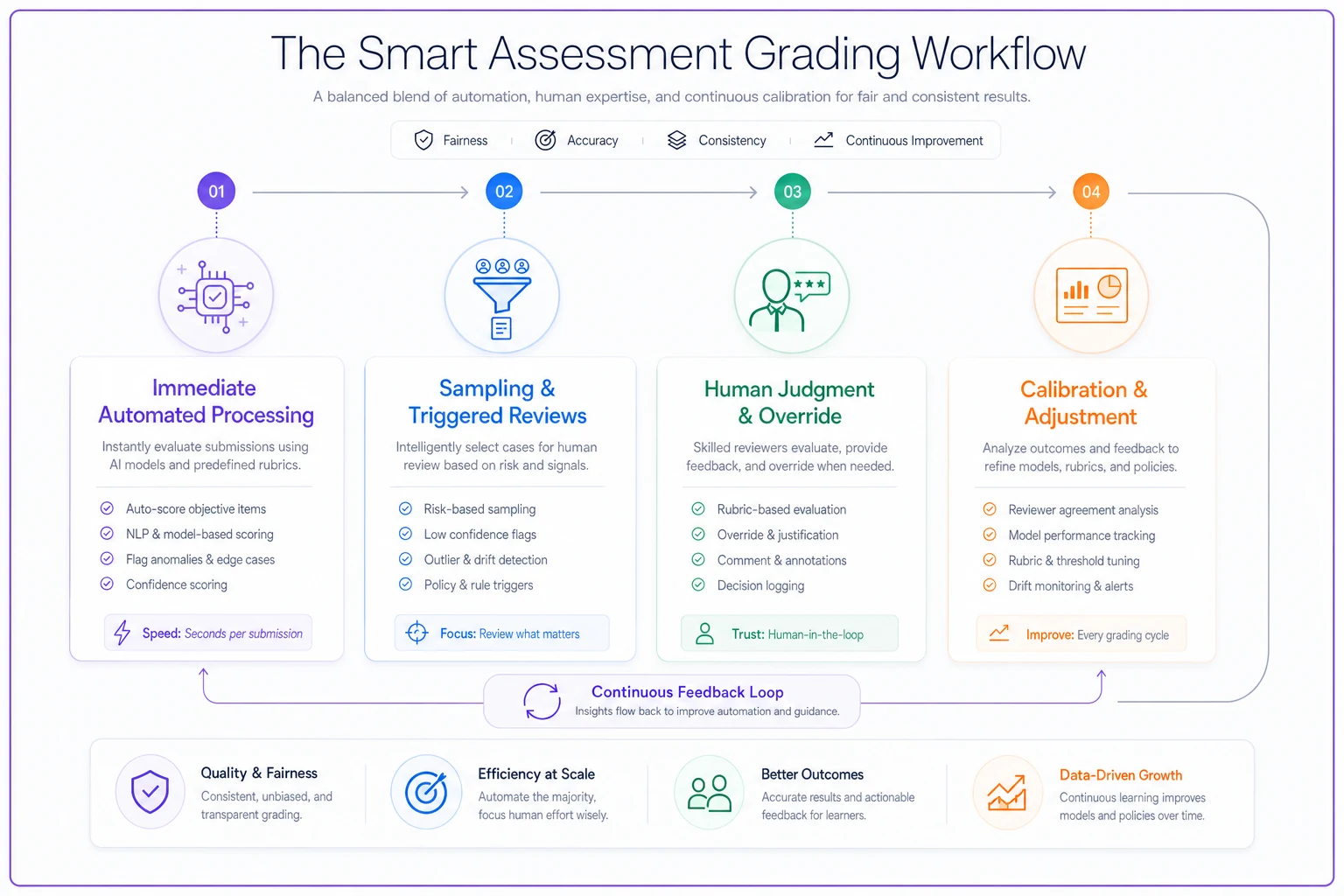
Example outcome: a corporate team reduced turnaround from three weeks to preliminary scores in four hours and final verified scores in three days by implementing this orchestration.
Managing stakeholder expectations
Implementation success depends on communication. Different stakeholders need different reassurances and evidence.
-
Students
automation handles mechanical checks so humans can deliver deeper, more useful feedback
-
Faculty
automation removes grunt work and preserves their role in high-judgment evaluation
-
Administrators
show total cost, time-to-results and quality metrics
Address common resistance with concrete mitigations and examples.
-
"AI can't evaluate creativity" — keep creative elements in human review
-
"This will miss nuance" — use confidence thresholds and sampling to catch edge cases
-
"Students will game it" — use calibration and pattern detection to detect gaming
-
"Too complex to implement" — use phased rollouts starting with simple automations
Building versus buying automation boundaries
Decide whether to build or buy based on uniqueness of needs, time horizon, and available resources. Both choices have real trade-offs in cost and flexibility.
-
Build if you have unique formats, regulatory needs, internal expertise and budget for ongoing maintenance
-
Buy if you need quick implementation, proven reliability and vendor support
Avoid platforms that force your assessments into their mold. Prefer configurable platforms that let you define rubrics, triggers and sampling rules.
-
Flexible rubric builders
-
Customizable automation rules
-
API access for custom components
-
Human review interfaces
-
Analytics and calibration tools
-
Integration capabilities
Quality safeguards that scale
Scaled automation needs explicit safeguards to avoid hiding systematic errors that small-scale manual grading would reveal quickly.
-
Inter-rater reliability monitoring; <80% agreement triggers recalibration
-
Automated anomaly detection for unusual score patterns
-
Periodic full manual audits (quarterly) on random complete assessments
-
Candidate appeals process with guaranteed human review
-
Version control and rollback for rubrics and automation rules
A healthcare training program learned the importance of safeguards the hard way after an automation error incorrectly failed 15% of candidates. Proper sampling and audits would have uncovered the issue in days.
Real implementation journey
A mid-sized university implemented these ideas for graduate qualifying exams covering multiple formats and reduced grading time dramatically through conservative rollout and iterative refinement.
Month 1–2: Redesigned rubrics into automatable and human components and established inter-rater baselines.
Month 3: Selected and configured a platform; set sampling at 30% for the first cycle.
Month 4: Piloted on historical exams, compared automated and manual scores, and refined thresholds.
Month 5: Live run—automated components finished in hours; human review of samples completed in days; results delivered in one week instead of six.
Months 6–8: Reduced sampling to 20% based on accuracy, added pattern detection, and improved feedback templates.
-
Grading time
3 weeks → 4 days
-
Inter-rater reliability
72% → 91%
-
Student satisfaction with feedback
+40%
-
Faculty grading burden
75% reduction
-
Cost per assessment
60% reduction
Making the math work for your context
ROI depends on your costs, volume and the cost of delayed results. Build a model that includes platform/setup costs, grader hourly rates, and soft costs like turnover and delayed learning.
-
Educational institutions
faculty hours $75–150/hr; breakeven often in 2–3 terms
-
Corporate training
lost productivity is key; breakeven can be immediate for high volume
-
Certification bodies
manual costs $20–50/assessment; automation $5–15/assessment; breakeven often in 6–12 months
Don't ignore soft costs such as grader burnout, delayed feedback impact on learning, reputation risk from inconsistency, and growth limits imposed by grading capacity.
When NOT to automate mixed-format grading
Automation boundaries are not always the right choice. Consider manual approaches when the context demands it.
-
Volume is too low to justify investment (typically <200 assessments/year)
-
Assessments change frequently, making automation maintenance costly
-
Extreme subjectivity dominates (art, creative writing, portfolios)
-
Regulatory rules require human grading
-
Stakeholder trust hasn't been established
Mixed-format grading doesn't have to mean burnout or lower quality. Define automation boundaries, sample intelligently, and route humans to high-value judgment tasks to save time while improving consistency and feedback.
Start small: pick one component to partially automate, measure results, build confidence, and expand. With conservative rollout and data-driven calibration you can sharply reduce grading time without sacrificing quality.
Ready to revolutionize your evaluation process?
Join over 2,000 organizations using Evaloly to optimize assessments, improve learner outcomes, and make data-driven decisions.