

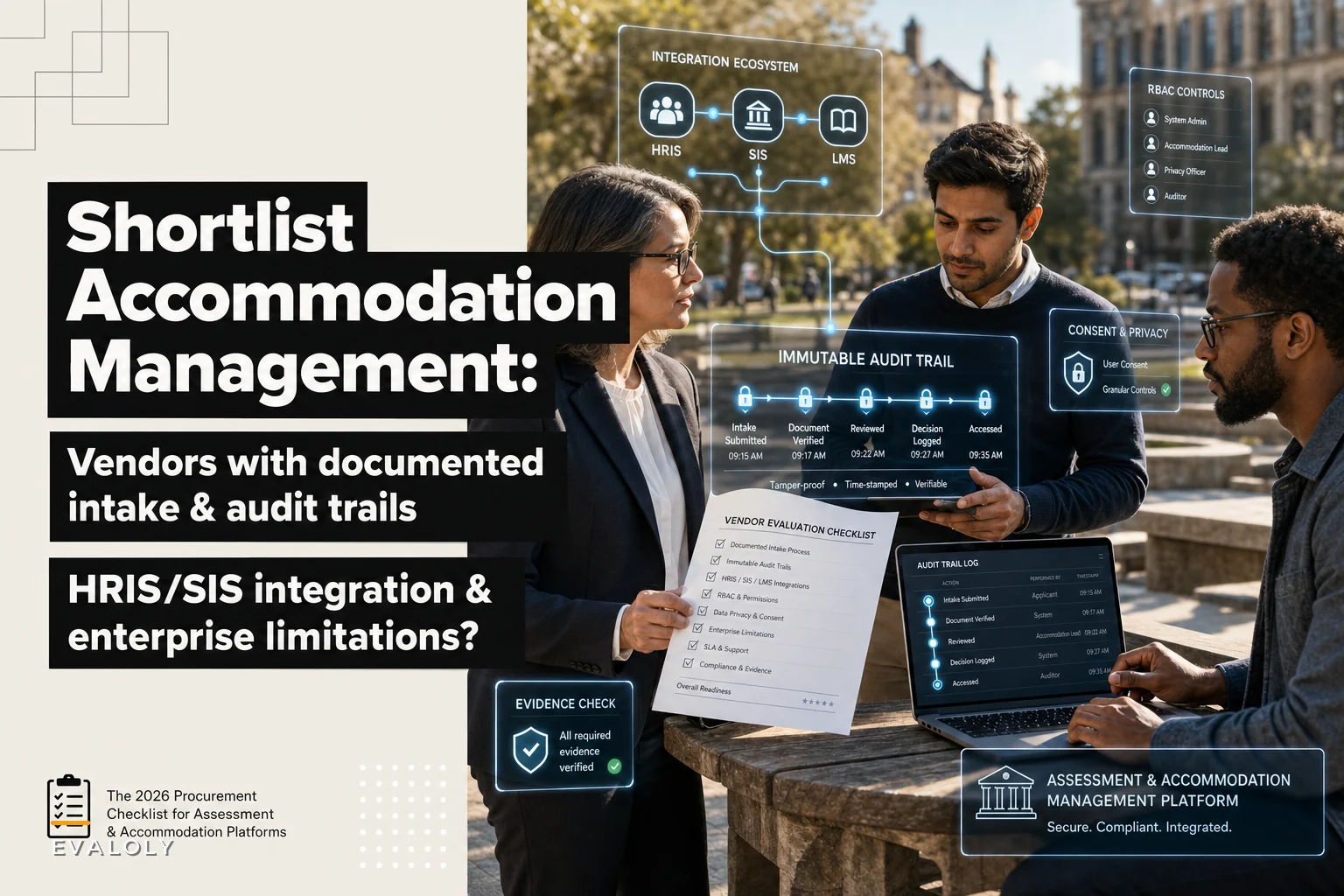

Most assessment-platform shortlists stop at item banks, grading pipelines, and LMS connectors. They barely touch the thing that generates the hardest compliance exposure: how you intake, document, and audit accommodation requests. If you've already worked through a buyer's guide for assessment platforms with mixed-format item banks and LMS connectors, you've probably noticed accommodation management sitting awkwardly in a footnote — treated like a checkbox rather than its own system with its own legal weight.
That's a real problem. Accommodation data is some of the most sensitive data your organization handles, and the workflows around it fail in quiet, expensive ways. A missing timestamp on an interactive-process email. A disability note sitting in a shared drive. A test accommodation granted verbally and never logged. None of that surfaces until an auditor, a plaintiff's attorney, or an OCR complaint asks you to produce the record — and you can't.
This brief is meant to fix that gap. It separates the three accommodation domains most buyers wrongly lump together, shortlists five vendors with documented intake and real audit logging, and gives you an evidence checklist so you can verify vendor claims instead of trusting the sales deck. You'll also get the procurement artifacts your security and privacy teams will actually ask for — RFP questions, an audit-field spec, a jurisdiction risk table, a decision checklist.
Three accommodation domains that don't belong in the same bucket
The single most common procurement mistake is assuming "accommodation management" is one product category. It isn't. The confidentiality rules, intake triggers, and audit obligations are different enough that a tool built for one domain often fails badly in another.
1. Workplace accommodations (ADA / FMLA)
This is the interactive-process world. An employee discloses a condition, HR documents the request, and a back-and-forth begins to find a reasonable accommodation. The governing frameworks are the ADA and, where leave is involved, FMLA.
The confidentiality rule is specific and strict: medical information must be stored separately from the general personnel file, with access limited to people who have a genuine need. In practice, this separation exists on paper but collapses in the tooling — the doctor's note ends up as an email attachment in the hiring manager's inbox, which is exactly what the ADA tells you not to do.
Audit need: a defensible timeline of the interactive process. Who requested what, when, what was offered, what was accepted or denied, and why.
2. Higher-ed student accommodations (FERPA)
Different world entirely. The student is the rights-holder, not the institution, and FERPA governs who can see the education record. Disability Services offices run intake, verify documentation, and issue accommodation letters to faculty — and critically, faculty are told what accommodation to provide, not the underlying diagnosis.
The intake trigger is student-initiated and recurring, often per-semester. The confidentiality challenge is that the accommodation letter travels to many faculty members, so the system has to share the accommodation while firewalling the medical basis. Audit need: proof of timely letter delivery, faculty acknowledgment, and a record that disclosure stayed inside FERPA's "legitimate educational interest" boundary.
3. Assessment and proctoring accommodations
This is the narrowest and most time-sensitive domain. A candidate needs extended time, a separate room, a screen reader, or a break schedule for a specific exam event. The window is short, the stakes are high (certification, licensure, admission), and a mistake is immediately visible — the candidate shows up and the accommodation either works or it doesn't.
The audit need is tight coupling between the approved accommodation and the delivered testing condition, with proctoring logs that prove the accommodation was honored without capturing more biometric or behavioral data than necessary. If you've thought about privacy-preserving proctoring at all, you already know the tension: the more you monitor to prove integrity, the more sensitive data you accumulate about a disabled candidate.
| Domain | Rights-holder | Primary law | Intake trigger | Confidentiality core | Hardest audit requirement |
|---|---|---|---|---|---|
| Workplace | Employee | ADA / FMLA | Employee disclosure | Medical file separation | Interactive-process timeline |
| Higher-ed | Student | FERPA | Per-term request | Share accommodation, hide diagnosis | Letter delivery + legitimate-interest log |
| Assessment | Candidate | ADA (+ exam rules) | Per-exam event | Minimal proctoring data capture | Approved-vs-delivered match |
Before you evaluate a single vendor, decide which domains you actually need to serve. A university running an employee-health clinic may need all three. A certification body may only need the assessment domain but with brutal audit precision. Buying a one-size tool for a multi-domain need is how you end up with three shadow spreadsheets a year later.
The five-vendor shortlist
These five are grouped by the domain they serve best, chosen for three things buyers consistently under-weight: documented intake workflows, real audit logging (not just "last modified" fields), and at least one HRIS, SIS, or LMS integration. Each entry includes a one-line differentiator, the org size it fits, and the concrete limitation that bites at enterprise scale.
Eliminate assessment bottlenecks.
Evaloly simplifies every step from test design to results analysis, making assessments faster and more reliable.
- Customizable test creation
- Automated grading and analytics
- Secure distribution and proctoring
No credit card required
> A note on honesty: vendor capabilities change, and marketing pages lag reality in both directions. Treat the differentiators below as starting hypotheses to verify with the evidence checklist further down — not as settled fact.
1. AbsenceSoft — workplace ADA/FMLA
-
Key differentiator Purpose-built for the ADA interactive process and FMLA leave tracking in one case-management flow, with correspondence templates that timestamp each step.
-
Org-size fit Mid-market to large employers (roughly 1,000+ employees) with a dedicated leave/accommodation team.
-
Enterprise limitation Strong on leave and workplace accommodation, but it is not a student/SIS tool — don't expect FERPA-shaped workflows or per-term letter generation. Deep HRIS integrations beyond the major platforms can require custom work.
2. Disclo — workplace ADA, privacy-forward intake
-
Key differentiator Separates medical documentation from the accommodation decision by design, so managers see the accommodation, not the diagnosis.
-
Org-size fit Growth-stage and mid-market employers that want modern UX and fast deployment.
-
Enterprise limitation Newer entrant, so the audit-export depth and large-enterprise security review artifacts — SOC 2 scope, penetration-test cadence, data-residency options — are worth verifying closely rather than assuming. Smaller integration catalog than legacy HRIS-adjacent players.
3. Accommodate (by Symplicity) — higher-ed student accommodations
-
Key differentiator Built around Disability Services workflows — testing-center scheduling, accommodation-letter generation, and faculty notification in one SIS-connected system.
-
Org-size fit Colleges and universities of nearly any size; scales reasonably well for multi-campus systems.
-
Enterprise limitation It's a higher-ed product. Using it for workplace ADA means bending FERPA-shaped logic into an ADA-shaped need. Reporting flexibility and bulk-letter QA can frustrate large offices processing thousands of letters per term.
4. ClockWork / AIM-style DS platforms — higher-ed testing accommodations
-
Key differentiator Tight testing-center operations — seat scheduling, extended-time enforcement, and exam-delivery logs tied to the approved accommodation.
-
Org-size fit Mid-size to large Disability Services offices that run high-volume testing centers.
-
Enterprise limitation Excellent at the testing-logistics layer, weaker as a system of record for the full accommodation lifecycle. SIS integration depth varies by product and version, so confirm the specific sync fields.
5. A dedicated assessment/proctoring platform with accommodation flags — assessment domain
-
Key differentiator Encodes approved accommodations directly into the exam-delivery configuration — extra time, break clock, assistive-tech allowlist — so the delivered condition can't silently drift from the approval.
-
Org-size fit Certification bodies and large testing programs with their own exam engine.
-
Enterprise limitation This covers the delivery of the accommodation, not the approval and documentation of it. You'll still need a case-management layer upstream, and you need to scrutinize how much proctoring data is retained per accommodated candidate.
Worth noting: no single product cleanly spans all three domains. The vendors that claim to usually do one well and fake the other two with generic form builders. If a demo shows the same intake form for an employee's FMLA request and a student's per-term letter, that's a red flag, not a feature.
How to verify the claims (evidence checklist and sourcing notes)
Sales decks will tell you everything you want to hear about audit logging. The job is to confirm it before signing. For each shortlisted vendor, collect and read the following — and note where the claim is documented versus merely asserted.
Primary (vendor-provided, but verifiable):
-
SOC 2 Type II report (not just a Type I or a logo) — check the report date and the scope section, not the cover page.
-
Data-processing agreement and subprocessor list.
-
A written description of the audit-trail fields the system records, ideally with a sample export.
-
Integration documentation (API docs or a named connector) for your specific HRIS/SIS/LMS.
Secondary (third-party):
-
Independent review sites for recurring complaints about data exports and reporting rigidity — these are the two things that fail quietly at scale.
-
Published case studies from organizations in your domain and roughly your size. A workplace case study tells you little about higher-ed fit.
-
Any public OCR, DOJ, or regulator references involving the customer base (rare, but revealing).
The test that cuts through marketing: ask the vendor to export a complete audit trail for a single sample accommodation case and hand you the raw file. If they can produce a machine-readable export with actor IDs, timestamps, and change history, the audit story is real. If it takes two weeks and comes back as a PDF screenshot, you have your answer.
Procurement artifacts
Targeted RFP questions
-
Show us the intake workflow for our specific domain(s). Where is medical documentation stored, and who can see it versus the accommodation decision?
-
Provide a sample machine-readable audit export for a single case. What fields are captured and what is not?
-
For denials and partial grants, how is the rationale recorded and surfaced on audit?
-
What is your legal-hold capability? Can we freeze a record and its history outside normal retention?
-
Which HRIS/SIS/LMS do you integrate with natively, and what fields sync bidirectionally?
-
For proctoring/testing, how do you ensure the delivered condition matches the approval, and how long is accommodation-related proctoring data retained?
-
Where is data stored, and what data-residency options exist for multi-jurisdiction operations?
Machine-readable audit-trail field spec
-
record_id— stable identifier for the accommodation case -
event_id— unique per logged action -
eventtype— requestcreated, docuploaded, decisionmade, lettersent, accommodationdelivered, etc. -
actoridandactorrole— who acted, in what capacity -
timestamp_utc— immutable, UTC, to the second -
change_diff— before/after values for the modified fields -
justification— free-text or coded reason, required on decisions and denials -
access_event— read-access logging for medical fields (who viewed, when) -
retentionclassandlegalhold_flag— retention category and hold status
If the system can't emit read-access events on sensitive fields, you cannot prove who saw the medical documentation — and that's precisely what you'll be asked to prove.
PHI / FERPA / HIPAA architecture checklist
-
[ ] Medical/diagnostic data stored in a logically separated store from decision data
-
[ ] Field-level access controls (accommodation visible, diagnosis restricted)
-
[ ] Encryption at rest and in transit, with documented key management
-
[ ] Read-access logging on sensitive fields, not just write-access
-
[ ] Explicit BAA available if any PHI is handled under HIPAA
-
[ ] FERPA "legitimate educational interest" enforced and logged for each disclosure
-
[ ] Configurable retention + legal-hold override
-
[ ] Subprocessor transparency and data-residency controls
Multi-jurisdiction risk table
| Jurisdiction factor | Risk | Mitigation to require from vendor |
|---|---|---|
| EU/UK (GDPR) health data | Special-category data, strict basis + residency | EU data residency, DPA, lawful-basis documentation |
| US state privacy laws (CA, etc.) | Varying access/deletion rights | Granular retention + deletion workflows |
| Multi-campus / multi-entity | Data bleed across legal entities | Tenant isolation, entity-scoped RBAC |
| Cross-border proctoring | Biometric data in restrictive states | Data-minimization config, regional storage |
Migration pitfalls
Migrations tend to go sideways in the same four ways. Historical cases imported without their audit history mean you inherit records you can't defend — insist on migrating the timeline, not just the current state. Free-text medical notes migrated into general fields re-mix data that was supposed to stay separated. Accommodation letters that don't carry their delivery and acknowledgment logs leave a gap in the FERPA trail that's awkward to explain later. And retention clocks resetting on import can accidentally extend how long you're holding sensitive data, which creates its own compliance problem.
Implementation timeline and internal roles
-
Weeks 1–3 Domain scoping, data mapping, and legal review of data flows.
-
Weeks 4–7 Configuration — workflows, RBAC, retention classes, field separation.
-
Weeks 8–12 Integration build and testing with HRIS/SIS/LMS.
-
Weeks 13–16 Migration with audit-history validation; parallel run.
-
Weeks 17–20+ Pilot with a single office/team, then phased rollout.
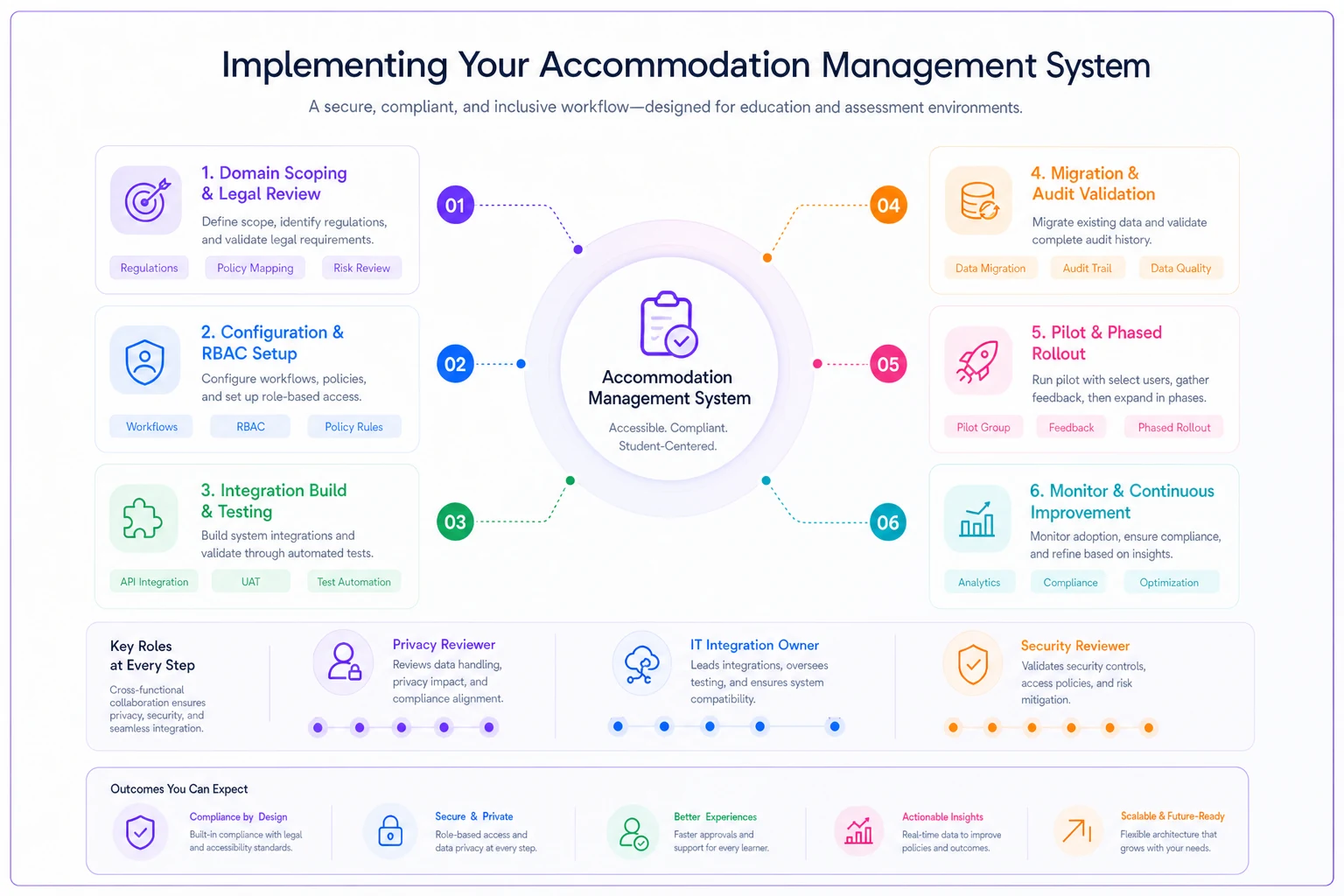
A simple visual keeps stakeholders aligned on who's responsible at each stage.
Required internal roles: an accommodation-domain owner (HR leave lead or DS director), a privacy/compliance reviewer, an IT integration owner, and a security reviewer who signs off on the audit-export and access-logging evidence before go-live. Skipping the security reviewer is the most common way a deployment ships with write-only logging and nobody notices for a year.
A real scenario
A regional professional-licensing body — a few hundred exam sittings a month, lean three-person operations team — had been handling test accommodations over email and a shared spreadsheet. Approved accommodations lived in one place; what proctors actually delivered lived somewhere else. When a candidate who'd been approved for extended time filed a complaint that she hadn't received it, the team spent the better part of two weeks reconstructing what happened across inboxes, and still couldn't produce a clean record of the approval-to-delivery chain.
After moving to a system that logged the approval and tied it to the delivered exam condition, the reconstruction problem mostly went away. The next time a dispute came up, pulling the full timeline — request, approval, delivery config, proctor log — took under an hour instead of days. The volume of disputes didn't really change. What changed was that each one stopped being a fire drill. That's the quiet value of real audit logging: it doesn't prevent every problem, it just means you can always answer the question when someone asks what actually happened.
When this makes sense — and when it doesn't
When a dedicated accommodation platform is worth it: you're processing enough volume that spreadsheets create real audit gaps, you operate in a regulated or litigation-exposed context, or you span multiple domains and need separation you can prove.
When it's overkill: a small program handling a handful of accommodations a year with a disciplined, well-documented manual process may get more value from tightening that process than from a six-month software deployment. Tooling doesn't fix an undefined workflow — it just makes a bad workflow faster.
Organizations serving all three domains who try to force one product across workplace, higher-ed, and assessment will almost always regret it. The confidentiality models conflict in ways that become obvious the moment a real incident or audit lands. You'll usually be better served by a domain-fit tool per domain, connected through your HRIS/SIS, than by one platform pretending to be three.
The accommodation gap in most procurement processes isn't a missing feature — it's a missing question. Before you compare vendors, decide which domains you serve, demand a real audit export, and make your security reviewer sign off on access logging. Do that, and the shortlist above becomes a starting point you can actually defend when someone asks to see the record.
Ready to revolutionize your evaluation process?
Join over 2,000 organizations using Evaloly to optimize assessments, improve learner outcomes, and make data-driven decisions.