


Most exposure-control advice was written for programs with massive item pools and full-time psychometricians. Certification bodies with 40,000 live items and adaptive delivery can afford to burn through inventory. You probably can't. If you're running a corporate training program, an internal certification, or a role-based skills assessment with a few hundred to a couple thousand items, the math works completely differently — and the standard advice actively hurts you.
The core tension is straightforward: small banks leak faster because the same items get seen more often, but you also can't afford aggressive rotation because you don't have enough items to rotate. That squeeze is where most programs quietly fail. This post is about managing item exposure control when your bank is small and your team is smaller.
The specific way small banks leak (and why it's not obvious)
Leakage in a big program usually looks like a coordinated breach — someone harvests items and posts them. In small programs, leakage is almost always organic and slow, which is why nobody catches it until scores start drifting.
Here's the pattern. A company runs a mandatory compliance recertification every year. The bank has about 300 items across six topic areas. The test pulls 40 items per attempt. Leadership wants a "fair, consistent" exam, so the same form — or nearly the same form — goes out to everyone. Within one cycle, roughly 800 employees have seen those 40 items. By the second cycle, the answers are in a shared Slack channel, a Google Doc titled "study guide," or just passed along verbally during onboarding.
The tell isn't the leak itself. It's the pass rate creeping up while nothing else changed. First year: 71% first-attempt pass. Second year: 84%. Third year: 91%. No new training, no easier content. That climb is your bank leaking in real time.
What makes small programs vulnerable is a combination most people underestimate:
-
High re-exposure per item. With 300 items and 40 per form, a single item might appear on 10–15% of all attempts.
-
Tight-knit populations. Corporate cohorts talk to each other. A hospital's nursing staff, a franchise's regional managers — these are not anonymous strangers. Information travels.
-
Predictable timing. Annual cycles mean everyone tests in the same two-week window, so leaked content is maximally useful right when the next batch sits down.
-
No monitoring. Nobody is watching per-item exposure because there's no dashboard and no one whose job it is to look.
If your metadata is too thin to support this — no content tags, no difficulty stats, no enemy links — that's the real bottleneck, and it's worth fixing before you touch rotation rules at all. Getting the minimum viable metadata onto legacy items is a project in itself; the prioritization heuristics in retrofitting legacy item banks for analytics are a good starting point because you don't need perfect tagging to run basic partitioning — you need enough.
Set exposure thresholds you can actually enforce
The classic exposure metric is the exposure rate — the proportion of test-takers who saw a given item. In large adaptive programs, people target a maximum exposure rate (r-max) somewhere around 0.20–0.33. For a small fixed-form or lightly randomized program, thinking in raw rates gets confusing fast, so translate it into counts you can actually watch.
Eliminate assessment bottlenecks.
Evaloly simplifies every step from test design to results analysis, making assessments faster and more reliable.
- Customizable test creation
- Automated grading and analytics
- Secure distribution and proctoring
No credit card required
Start by deciding your exposure budget per item per window: how many candidates may see an item before it needs to rest. A workable default for small corporate programs:
| Program type | Bank size | Suggested max exposures per item per cycle | Rest before reuse |
|---|---|---|---|
| High-stakes internal cert (promotion, licensure-adjacent) | 300–800 | 150–250 candidates | Full next cycle |
| Compliance / annual recert | 200–500 | 300–400 candidates | One cycle |
| Low-stakes knowledge checks | 150–400 | No hard cap, monitor drift | Optional |
| Hiring assessments (rolling) | 400–1,200 | 200–300 candidates per rolling quarter | 2 quarters |
These aren't sacred numbers. The point is to pick a ceiling before the cycle starts, not to discover after the fact that item #114 showed up on 62% of attempts.
One mistake worth calling out: teams often set a threshold and then never check whether their bank is big enough to honor it. If you cap each item at 250 exposures, pull 40 per form, and have 300 items, you can only serve about 1,875 attempts before something has to give (300 × 250 ÷ 40). If you're testing 3,000 people a year, the math already broke and no policy will save you. You either grow the bank or accept overlap — and it's better to know that in January than to find out in November.
Rotation windows: rest items, don't retire them
Small programs can't afford to retire items permanently the way large banks do. You spent real money writing them. The move is rotation, not retirement — pull an over-exposed item out of circulation for a defined window, then bring it back once the population that saw it has largely cycled out.
Think of rotation windows in terms of population turnover, not calendar time. An item is "safe" to reuse when most of the people who saw it are no longer testing. In a company with 25% annual staff turnover plus role changes, a two-year rest means roughly half the exposed population is gone. In a stable team with 5% turnover, that same item stays contaminated far longer, and rotation buys you almost nothing.
A practical rotation setup for a mid-size internal program:
-
Split the bank into three rotation groups of roughly equal difficulty and content coverage — call them A, B, and C.
-
Deploy two groups per cycle (A+B), keeping the third (C) resting.
-
Next cycle, rotate deploy B+C, rest A.
-
Track cumulative exposure per item across the cycles it's live, not just within one.
-
Force a rest for any item that exceeds its exposure ceiling even mid-cycle.
This gives every item a built-in cool-down and stretches a modest bank across far more attempts. The catch — and it's a real one — is that your three groups have to be genuinely equivalent in difficulty and content coverage, or your rotation quietly introduces form-to-form unfairness. Rotation and content balancing have to be designed together rather than bolted on later.
Pool partitioning: stop serving one giant pile
The biggest single improvement most small programs can make is to stop treating the bank as one undifferentiated pool. Partition it.
Partitioning means slicing the bank along dimensions that matter for both fairness and exposure, then drawing each form from within those slices. Two partitions do most of the work:
Content partitions. If your blueprint says 25% of the exam covers "data privacy," then draw exactly that share from the data-privacy slice on every form. This is table stakes for validity, but it also controls exposure: without content partitioning, random draws over-sample whatever topic happens to have the most items, burning those items faster.
Enemy/clone partitioning. Items that are near-duplicates, or that give away each other's answers, must never appear on the same form. In small banks this happens constantly because item writers unknowingly rewrite the same question three different ways. Group known enemies so the draw engine picks at most one per form.
Difficulty partitioning. Bucket items into easy/medium/hard bands and require each form to pull a set mix. This keeps rotation groups comparable and prevents the accidental "everyone got the hard form this month" complaint that erodes trust in the whole program.
If your metadata is too thin to support this — no content tags, no difficulty stats, no enemy links — that's the real bottleneck, and it's worth fixing before you touch rotation rules at all. Getting the minimum viable metadata onto legacy items is a project in itself; the prioritization heuristics in retrofitting legacy item banks for analytics are a good starting point because you don't need perfect tagging to run basic partitioning — you need enough.
Monitoring heuristics that don't require a psychometrician
You don't need a stats team to catch leakage early. You need three or four cheap signals checked on a schedule. These are the heuristics that actually surface problems in small programs:
-
Item p-value drift. If an item's proportion-correct jumps by more than about 0.15 between cycles with no content change, treat it as possibly compromised and pull it for review. A compliance item that sat at 0.62 correct for two years and suddenly hits 0.88 didn't get easier — it got shared.
-
Response-time collapse. When average time-on-item drops sharply while accuracy rises, people are recognizing rather than solving. This is one of the earliest and most reliable leak signals.
-
Cohort pass-rate slope. Track first-attempt pass rate by month or cohort. A steady upward slope with flat training investment is your bank leaking. A sudden step-change often points to a specific leaked form.
-
Answer-pattern similarity within teams. If everyone from one department gives identical wrong answers on the same items, you're looking at a shared study doc, not a coincidence.
Set thresholds for each and a rule for what happens when they trip. "Investigate" is not a plan. "P-value drift > 0.15 → item moves to review queue and is suspended from the active pool until a human clears it" is a plan.
Combine p-value drift and response-time collapse before suspending an item — the dual signal reduces false positives.
One honest caveat: p-value drift also fires when you genuinely improve training. Don't auto-retire on drift alone. Pair it with response-time collapse — the combination of faster and more correct is what separates a real leak from real learning.
Automated scheduling: the part small teams skip
Everything above falls apart if it depends on someone remembering to rotate groups every quarter. The manual version — a spreadsheet where someone hand-tracks exposure counts and manually swaps item groups — survives about two cycles before it drifts, someone leaves, and the tracking dies quietly.
-
Tag every item with content area, difficulty band, rotation group, and enemy links.
-
Configure exposure ceilings per item at the system level so the draw engine stops serving an item once it hits its cap.
-
Automate rotation swaps on a schedule tied to your cycle, so resting groups activate and over-exposed groups sit out without manual intervention.
-
Auto-flag drift by having the platform run p-value and response-time checks after each batch and drop suspect items into a review queue.
-
Schedule the monitoring digest so a human gets a short "here's what tripped" summary weekly or per-cohort, instead of nobody looking until scores are already wrong.
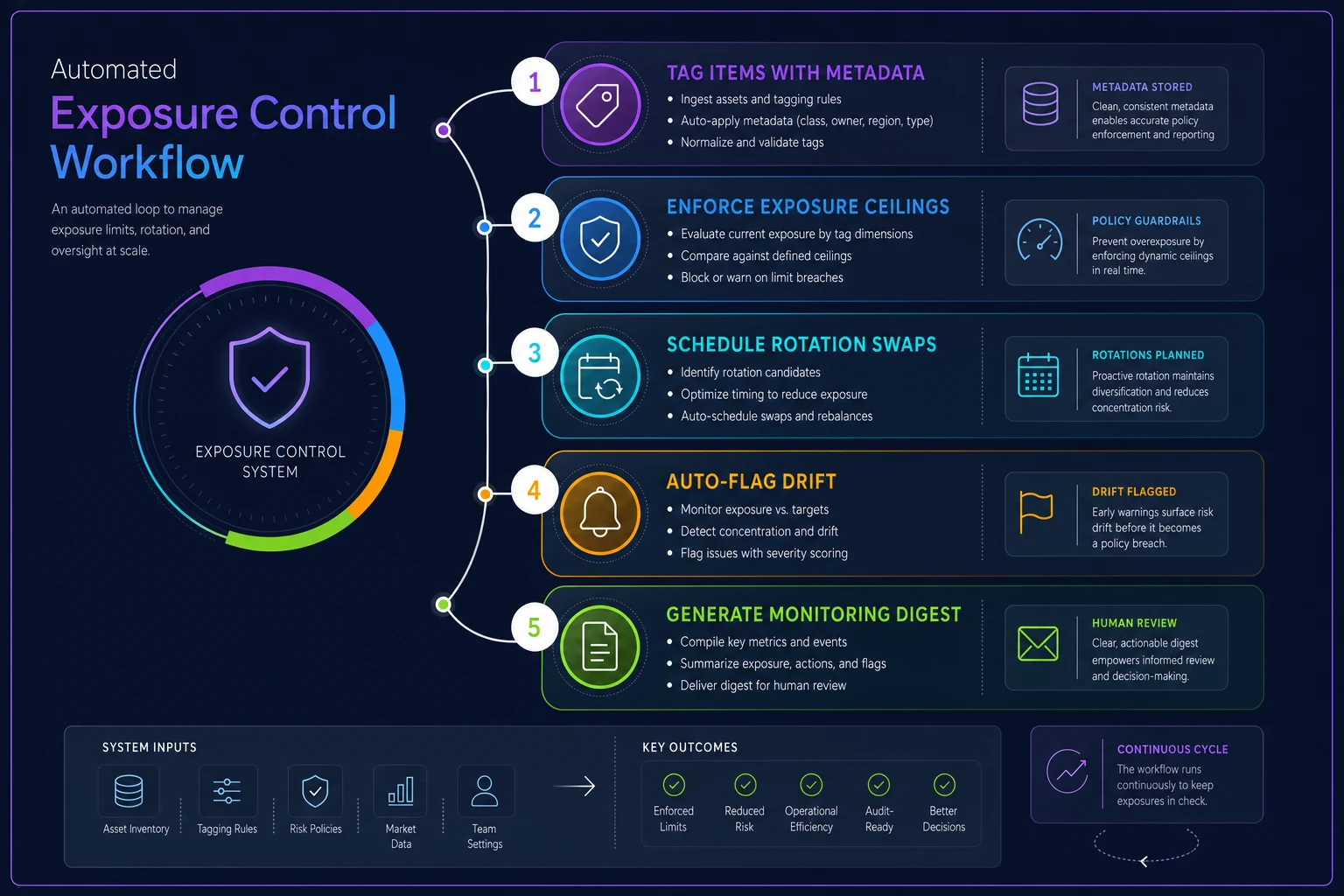
Here's a compact visual workflow that ties those automation steps together and shows how flags flow into a human review queue.
This is where an assessment platform with real exposure-control and automated scheduling earns its keep — not because automation is exciting, but because rotation policies that depend on human diligence in a two-person L&D team have a predictable failure mode. The value isn't fancy; it's that the rule keeps running when everyone's busy.
A realistic before/after
A regional financial services firm ran an annual internal compliance certification. Bank of about 340 items, 45 pulled per attempt, roughly 1,100 employees testing each year on the same lightly shuffled pool. First-attempt pass rate had climbed from the mid-70s to around 90% over three cycles, and an internal audit flagged that the exam might not be defensible anymore.
They didn't rewrite the whole bank. They partitioned the existing items into three rotation groups balanced on content and difficulty, set a per-item exposure ceiling of about 300 candidates per cycle, added enemy links for the near-duplicate items writers had unknowingly created, and turned on drift monitoring across p-value and response time.
Within two cycles the first-attempt pass rate settled back into the high 70s to low 80s — roughly where it sat before the leak took hold — and the audit concern went away. They wrote maybe 60 new items over that period, not 340, just enough to fill thin partitions. The fix was mostly organization, not production.
When this makes sense — and when it doesn't
Do this if your program is high-stakes enough that a wrong pass matters (promotions, regulated roles, licensure-adjacent internal certs), if your test population talks to each other, and if you're running the same content across annual or quarterly cycles.
Skip most of it for genuinely low-stakes knowledge checks where a leaked answer doesn't hurt anyone. Formative quizzes inside a course don't need rotation windows and enemy partitioning — that's overhead with no payoff, and building it anyway is a common way small teams burn time they don't have.
Be careful if your bank is too small to rotate at all. If you have 150 items and pull 45 per form, three rotation groups leave you drawing 45 from roughly 50, which means barely any variation. In that case the honest answer is: your first project is growing the bank, and no exposure policy substitutes for having enough items.
The takeaway
Exposure control for small programs isn't a scaled-down version of what big certification bodies do — it's a different problem with different math. You're not trying to make items disappear forever; you're trying to spread limited inventory across a talkative, predictable population without letting any single item get worn out. Set exposure ceilings in counts you'll actually watch, rotate on population turnover rather than the calendar, partition the bank so draws stay balanced, and watch the two signals that separate leaks from learning. Then automate the enforcement, because the version that depends on someone remembering will not survive the year.
Ready to revolutionize your evaluation process?
Join over 2,000 organizations using Evaloly to optimize assessments, improve learner outcomes, and make data-driven decisions.