

Your organization probably has an item bank sitting somewhere. Maybe it's 5,000 questions in an old LMS, 12,000 items scattered across Excel files, or a dusty test platform from 2015 that everyone forgot about. The questions work fine for creating assessments, but when someone asks "What skills do we actually test?" or "Which questions perform poorly?" you're stuck manually sorting through chaos.
The worst part? Most retrofitting projects die before they start. Teams look at their 8,000-question mess, realize proper tagging would take months, and give up. Or they spend six weeks creating the perfect metadata schema, tag 200 questions, then abandon the project when reality hits.
Here's what actually works when retrofitting item banks for analytics—without dedicating your entire quarter to it.
The 80/20 metadata approach that changes everything
Traditional wisdom says you need comprehensive metadata before running analytics. Domain, subdomain, difficulty level, Bloom's taxonomy, competency alignment, format type, author, review date, usage history—the list grows until tagging one question takes 15 minutes.
But operational reality looks different. A healthcare training company had 11,000 nursing exam questions with zero metadata. They needed basic performance analytics within three weeks for accreditation reporting. Full tagging would've taken four months.
Content area (just 12 broad categories) Question format (multiple choice, select all, or scenario-based) Last usage date (pulled automatically from their system logs)
That's it. No complex hierarchies. No granular skill mapping. Just enough structure to answer their critical questions: Which content areas have the lowest pass rates? Are scenario questions performing worse than standard MCQs? What percentage of our bank is actively used?
Their team tagged all 11,000 questions in eight days using bulk operations. Within two weeks, they had dashboards showing pass rates by content area, item difficulty distributions, usage patterns revealing 3,400 questions hadn't been used in two years, and format performance comparisons.
The minimal metadata wasn't perfect, but it transformed their item bank from a black box into something measurable. They could finally make data-driven decisions about which questions to retire, which areas needed more items, and where to focus improvement efforts.
Prioritization rules that prevent analysis paralysis
The biggest retrofitting mistake is treating all items equally. A manufacturing certification body tried tagging their entire 15,000-question bank chronologically. After three weeks, they'd processed 2,000 rarely-used practice questions while their high-stakes certification items remained untagged.
Eliminate assessment bottlenecks.
Evaloly simplifies every step from test design to results analysis, making assessments faster and more reliable.
- Customizable test creation
- Automated grading and analytics
- Secure distribution and proctoring
No credit card required
Smart prioritization changes the game. Here's the triage system that actually works:
| Priority | Description |
|---|---|
| Priority 1: High-stakes items | (certification exams, compliance assessments, final evaluations) Tag these first, even if it's just 500 questions. These items directly impact pass/fail decisions and typically get the most scrutiny. |
| Priority 2: Frequently-used questions | (appearing in 3+ assessments per year) Your system logs know which questions get used. Export usage data and focus on items that actually see deployment. |
| Priority 3: Recently-created content | (last 18 months) Newer questions often reflect current standards and have authors who remember the intent. Plus, they're more likely to stay in rotation. |
| Priority 4: Problem children | (high failure rates or discrimination issues) If you have any performance data, identify questions where more than 70% of test-takers fail or where high performers do worse than low performers. These need investigation anyway. |
| Priority 5: Everything else | The bottom 40% of your bank probably doesn't need immediate tagging. Mark these as "archive-pending review" and move on. |
A tech company's L&D team used this approach on their 6,000-question programming assessment bank. They fully tagged 1,800 priority items in two weeks, giving them enough data to run meaningful analytics. The remaining 4,200 questions? Tagged gradually over six months as bandwidth allowed, with 1,500 eventually deleted as obsolete.
Bulk operations that turn weeks into hours
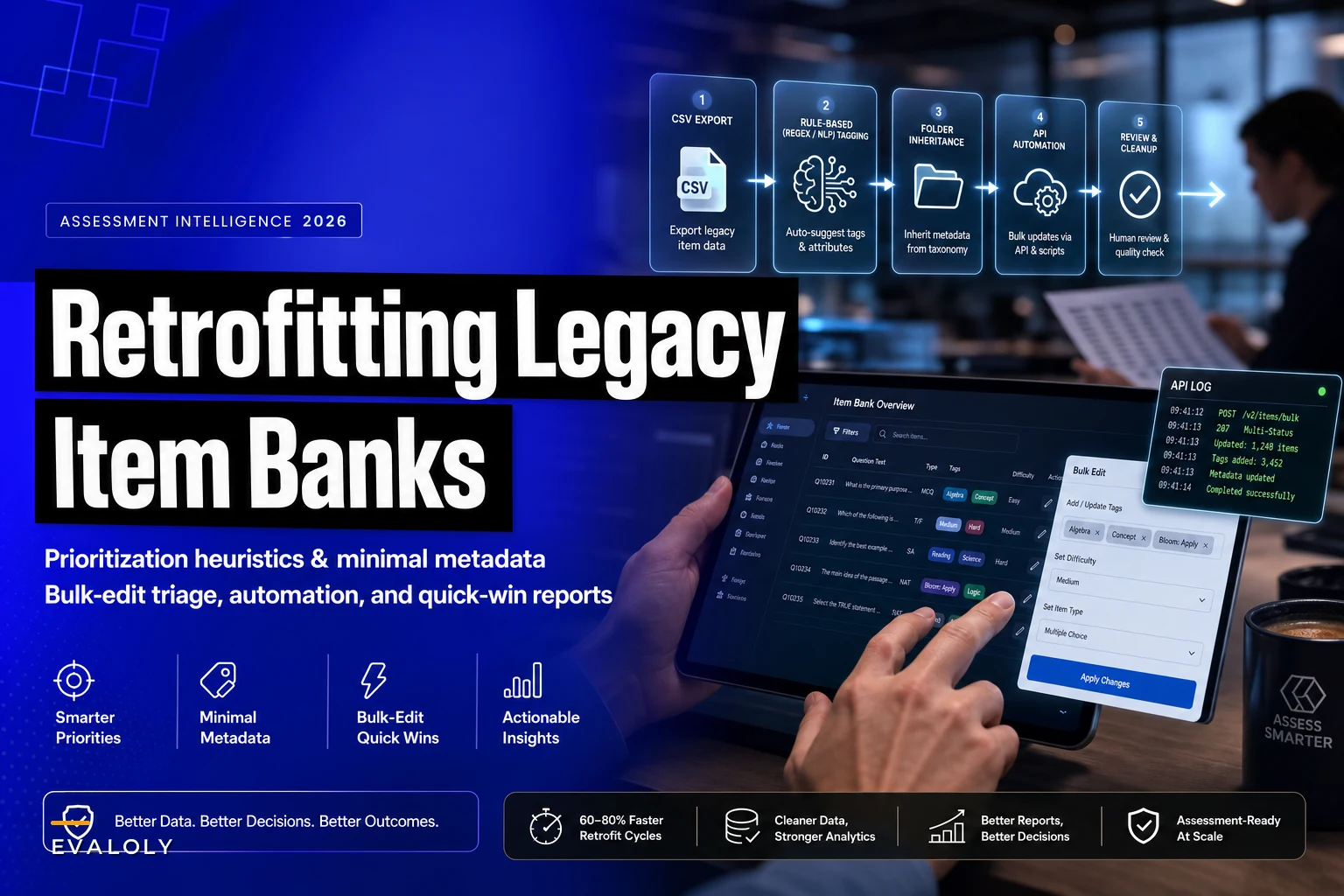
Manual tagging destroys retrofitting projects. Click question, open editor, add metadata, save, repeat 5,000 times—nobody survives that workflow. Smart bulk operations make retrofitting feasible.
Most platforms hide bulk editing features or make them unnecessarily complex. But even basic systems usually have backdoor methods for mass updates. Here's what to look for:
-
CSV export/import workflows Export your questions to CSV, add metadata columns in Excel, then reimport. Sounds basic, but it works. A corporate training team retrofitted 4,000 questions this way in three days.
-
Find-and-replace at scale Questions often contain natural metadata markers. "Chapter 5" in the question stem? That's your topic tag. "Select all that apply"? That's your format type. Regular expressions can auto-tag thousands of questions based on these patterns.
-
Folder-based inheritance If your system uses folders, move questions into topic-based folders first, then apply metadata to entire folders at once. One university tagged 8,000 questions by reorganizing their folder structure, then running folder-level updates.
-
API automation For technical teams, most modern platforms have APIs. A simple Python script can read questions, apply rule-based tags, and update metadata faster than any UI.
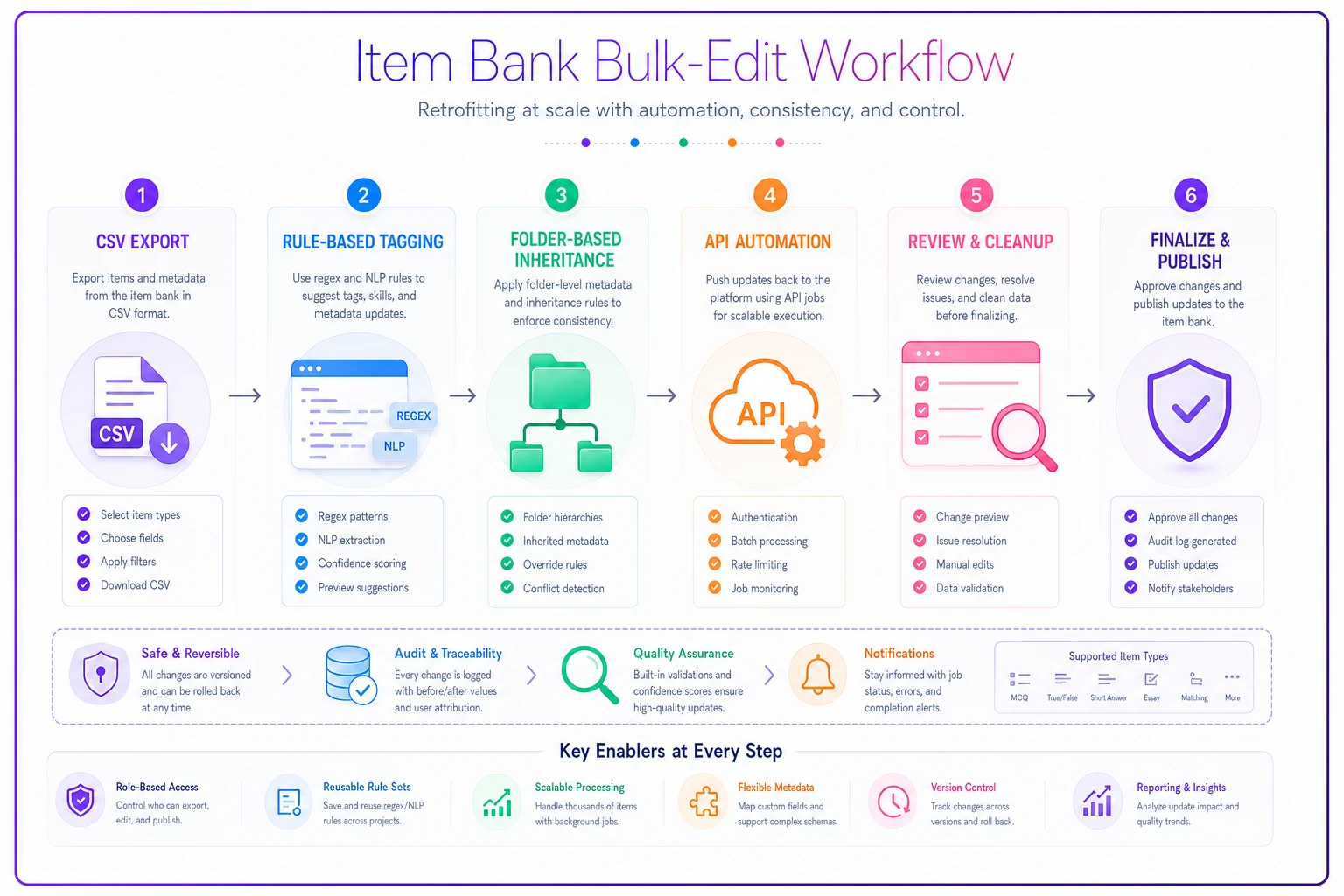
This visual maps the bulk-edit workflow.
The key is accepting imperfection. Bulk operations create roughly-correct metadata that you can refine later. An insurance training provider bulk-tagged 5,000 questions with approximate difficulty levels based on historical pass rates. Not perfect, but good enough to identify which topics needed easier practice questions.
Quick-win reports that prove immediate value
Retrofitting projects need early wins to maintain momentum. Complex analytics can wait—start with reports that deliver value in week one.
-
The "Dead Weight" Report List all questions unused in the past 18 months. A pharmaceutical company discovered 2,200 unused questions consuming maintenance time. They archived them immediately, reducing their active bank by 35%.
-
The "Problem Pattern" Report Group questions by pass rate and flag outliers. Simple, but powerful. An accounting certification body found 89 questions with sub-20% pass rates, revealing unclear wording patterns they could fix systematically.
-
The "Content Gap" Analysis Count questions per topic and compare to your assessment blueprints. A nursing program realized they had 400 questions on medication administration but only 50 on patient communication—a critical gap their accreditors had flagged.
-
The "Format Performance" Comparison Compare pass rates across question types. An IT certification discovered their scenario-based questions had 40% lower pass rates than standard MCQs, not because they were harder, but because of confusing navigation.
These reports don't require perfect metadata. Even rough categorization reveals patterns that drive immediate improvements.
The compound effect of incremental tagging
Perfect metadata on day one isn't the goal. The goal is good-enough metadata that improves continuously. A medical device manufacturer started with three basic tags on 3,000 questions.
Over eight months, they added competency alignments, refined difficulty ratings based on actual performance, tagged cognitive levels for high-priority items, added regulatory standard mappings, and incorporated review cycle dates.
Each enhancement built on the previous work. By month eight, they had rich analytics capability—but they started seeing value in week two. This incremental approach meant their retrofitting project never stalled.
Teams that succeed with retrofitting share one trait: they start before they're ready. They accept that 60% metadata coverage beats 0% coverage. They know rough categorization today beats perfect categorization never.
When automation accelerates the retrofit process
Manual retrofitting hits a wall around 2,000 questions. That's when smart automation becomes essential—not to replace human judgment, but to handle the mechanical parts.
Natural language processing can suggest initial tags based on question content. A financial services firm used text analysis to pre-categorize 7,000 questions into topic areas with 75% accuracy. Human reviewers then just needed to verify and correct, cutting tagging time by two-thirds.
Pattern matching identifies structural metadata automatically. Questions starting with "Which of the following" get tagged as multiple choice. Items containing "Select all" become multi-select. Stems with scenarios over 100 words get flagged as case-based. These patterns catch 90% of format types without human intervention.
AI-assisted platforms can also identify related questions for bulk updates. When you tag one question about "accounts receivable," the system suggests 47 similar questions that likely need the same tag. This clustering approach helped an HR assessment company retrofit their competency-based question banks in half the expected time.
The trick is using automation for broad strokes while preserving human oversight for nuance. Machines excel at pattern recognition and bulk classification. Humans excel at catching edge cases and ensuring pedagogical accuracy. Combined properly, you get speed without sacrificing quality.
The migration mindset that ensures sustainability
Retrofitting isn't just about adding metadata—it's about transforming how your organization thinks about item banks. Successful retrofits change three things permanently:
-
From storage to intelligence
Your item bank stops being a filing cabinet and becomes a data source. A chemical manufacturer now runs monthly item analysis reports, retiring poor performers and identifying content gaps automatically.
-
From individual to systematic
Question creation shifts from isolated efforts to coordinated development. New items inherit metadata templates. Authors follow naming conventions. Review cycles track quality metrics systematically.
-
From reactive to proactive
Instead of discovering problems during high-stakes exams, you identify issues through continuous monitoring. Pass rates drop in a specific domain? You know within days, not months.
This shift requires embedding metadata into workflows, not just retrofitting existing content. When a global logistics company retrofitted their 5,000-question bank, they simultaneously updated their authoring guidelines. New questions now require three metadata fields before submission. Their retrofit investment pays dividends on every future question.
Common retrofitting failures and how to avoid them
Watching retrofit projects taught me what kills them. The patterns are surprisingly consistent.
-
Scope creep destroys momentum. A team starts with five metadata fields, then adds three more "while we're at it," then another four "for future flexibility." Suddenly, tagging one question takes 20 minutes and progress grinds to a halt. Solution: Lock your initial scope and enhance later.
-
Perfection paralysis stops progress. Teams spend months designing the ultimate taxonomy before tagging a single question. Meanwhile, assessments continue running without analytics. Solution: Start with good enough and iterate.
-
All-or-nothing thinking creates abandonment. Organizations assume they must retrofit everything immediately or not at all. When reality hits, they quit entirely. Solution: Accept partial coverage as valuable progress.
-
Tool obsession distracts from goals. Teams evaluate fifteen tagging platforms, seeking the perfect solution. Six months later, nothing's been tagged. Solution: Use what you have, even if it's Excel.
-
Solo efforts burn out. One person gets assigned the entire retrofit project. They tag 500 questions enthusiastically, 500 more grudgingly, then quit. Solution: Distribute work across teams and rotate responsibilities.
Organizations that successfully retrofit share realistic expectations. They know some questions won't get tagged. They accept that metadata will be imperfect. They celebrate incremental progress over impossible perfection.
The real ROI of retrofitting legacy banks
The numbers tell the story. An aerospace manufacturer retrofitted 4,000 technical assessment questions over three months. Effort: roughly 200 person-hours. Results: identified 800 outdated questions referencing obsolete procedures, discovered their electrical systems domain had 60% fewer questions than needed, reduced assessment creation time by 40% through better question discovery, improved pass rates by 12% after removing problematic items, and saved $45,000 annually in subject matter expert review time.
But the real value goes beyond metrics. Retrofitting transforms your item bank from a cost center to a strategic asset. You stop guessing about assessment quality and start knowing. You stop reacting to problems and start preventing them.
More importantly, retrofitting builds organizational capability. Teams learn to think systematically about assessment design. They develop data literacy around item performance. They create processes that prevent future metadata decay.
Starting your retrofit journey this week
Don't wait for perfect conditions. Don't design elaborate schemas. Don't form committees. Start with these three actions:
-
Run a usage audit Export your last year of assessment data. Identify which questions actually get used. This takes two hours and immediately shows what's worth retrofitting.
-
Pick three metadata fields Choose the absolute minimum that enables basic analytics. Topic area, question type, and difficulty usually work. Resist adding more until these are complete.
-
Tag 100 questions Not 1,000. Not all of them. Just 100. Use bulk operations if possible. Learn what works and what doesn't before scaling up.
The path from legacy chaos to analytical insight isn't through massive transformation projects. It's through incremental improvements that compound over time. Every tagged question makes your item bank slightly smarter. Every added metadata field enables new insights. Every cleaned dataset improves decision-making.
Your legacy item bank contains years of institutional knowledge trapped in an unusable format. Retrofitting releases that knowledge, transforming dead storage into living intelligence. The question isn't whether to retrofit, but how quickly you can start capturing value from what you already own.
Organizations succeeding with assessment analytics didn't wait for perfect solutions. They started with basic retrofitting, learned from early results, and continuously improved. Their item banks evolved from filing systems to intelligence platforms, one pragmatic decision at a time.
Ready to revolutionize your evaluation process?
Join over 2,000 organizations using Evaloly to optimize assessments, improve learner outcomes, and make data-driven decisions.